






When you think about purchasing an LED display, a common question that often arises is: “What is the optimal viewing distance for this LED display?”. Many users may find it confusing to determine the best viewing distance to ensure a comfortable and clear visual experience.
Whether it’s a blank screen, distorted display, or connectivity issue, understanding the status and functionality of your receiving card is crucial.
Today, we will delve into the topic of LED display viewing distance and share practical calculation methods.
In This Article
- What is Viewing Distance?
- The Importance of Viewing Distance
- Factors Affecting Viewing Distance
- Pixel Pitch and Viewing Distance
- Resolution and Viewing Distance
- Size and Viewing Distance
- LED Viewing Distance of Indoor and Outdoor Displays
- How to Calculate the Viewing Distance of an LED Display
- Practical Application Scenario Analysis
- Conclusion
What is Viewing Distance?
Viewing distance refers to the space between the viewer’s eyes and the LED display. It signifies the proximity required for clear visibility of content without detecting individual pixel structures. At the right viewing distance, viewers can enjoy a sharp image devoid of fatigue or strain.
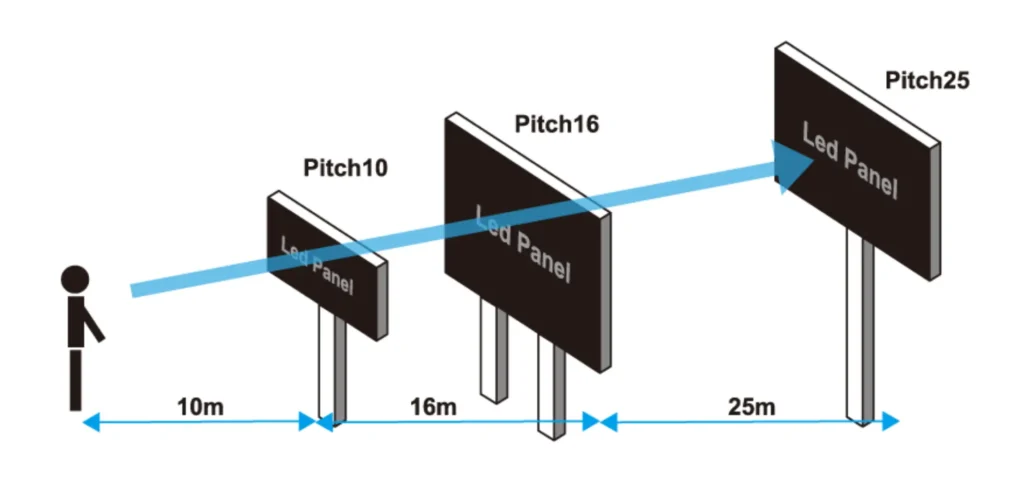
When discussing LED display viewing distance, a minimum value is typically set. This is the shortest distance at which your eyes can adjust and see the image clearly. From there, as long as you can still see the content on the screen, you can move as far away as you like.
Similarly, a maximum value is also set, which is the farthest distance at which your eyes can adjust and see the image clearly. Beyond this value, you may not be able to see the content on the screen clearly.
The Importance of Viewing Distance
Understanding LED viewing distance helps you choose the right LED display for your needs. It can assist in analyzing and determining the optimal display performance such as:
- Selecting the appropriate screen size
- Choosing the ideal pixel pitch for the LED display
- Estimating the best installation height for the LED display
- Providing viewers with a perfect visual experience
To further understand LED viewing distance, you should be able to learn and recognize its relationship with other factors.
Factors Affecting Viewing Distance
Understanding LED viewing distance helps you choose the right LED display for your needs. It can assist in analyzing and determining the optimal display parameters such as:
- Pixel Pitch: This directly determines the pixel density of the screen. The smaller the pixel pitch, the lower the minimum viewing distance, meaning you can view the display more closely.
- Resolution: Higher resolution means richer image details, allowing for a closer viewing distance.
- Size: The size of the LED display affects the viewing distance. Larger LED screens have a higher viewing distance, while smaller LED screens have a lower viewing distance.
Pixel Pitch and Viewing Distance
Pixel pitch refers to the distance between two adjacent pixels on an LED display, usually represented as “P” followed by a number, such as P4, indicating a pixel pitch of 4 millimeters.
Pixel pitch has a direct impact on LED viewing distance. The larger the pixel pitch, the greater the minimum viewing distance, meaning you need to maintain a sufficient distance to view the display comfortably. When choosing pixel pitch, you need to consider the installation location of the display and the distance of the viewing audience to ensure the display provides a perfect visual experience without distortion.
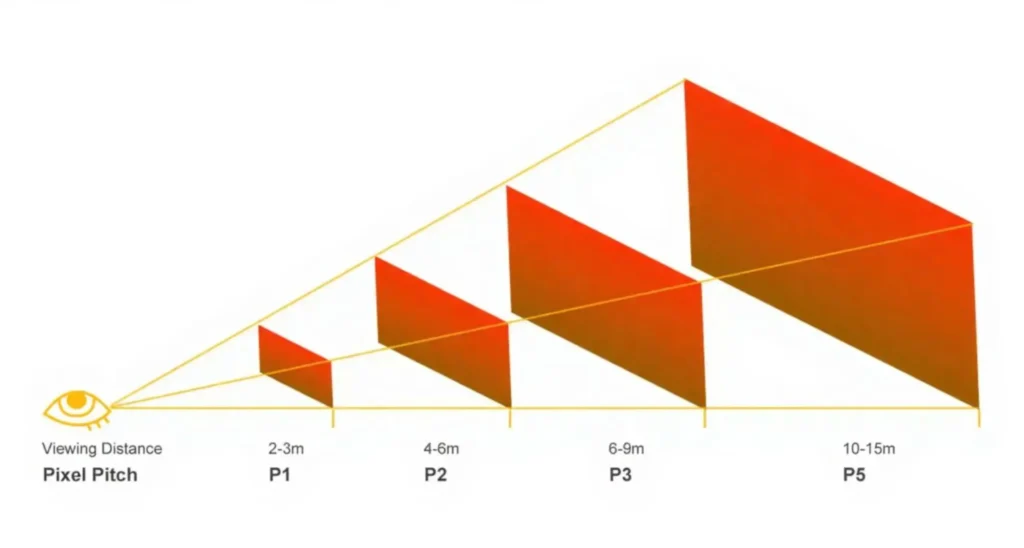
The relationship between pixel pitch and viewing distance can be approximated using the following formulas:
- Minimum viewing distance = Pixel pitch x 1000
- Optimal viewing distance = Pixel pitch x 2000 ~ Pixel pitch x 3000
- Maximum viewing distance = Pixel pitch x 30000
For example, if you have a P3 LED display, the optimal viewing distance is approximately 3 to 9 meters. This means that within this distance range, you can obtain a clear image and a comfortable visual experience. Conversely, if the minimum distance from the installation location to the viewing audience is about 5 meters, you should choose a pixel pitch of P5 or smaller, such as P4, P3, etc.
Here is a summary table for your reference, showing various pixel pitches and their suitable viewing distances:
Pixel Pitch for Viewing Distance
| Pixel Pitch | Minimum Viewing Distance | Optimal Viewing Distance | Maximum viewing distance |
| P1.25 mm | 1.25 m (4.1ft) | 2.5 to 3.75 m (8.2ft to 12.3ft) | 38m (127.4 ft) |
| P1.5 mm | 1.5 m (4.9ft) | 3 to 4.5 m (9.8ft to 14.8ft) | 45m (147.6 ft) |
| P1.86 mm | 1.86 m (6.1ft) | 3.7 to 5.6 m (12.1ft to 18.4ft) | 56m (183.7 ft) |
| P2 mm | 2 m (6.6ft) | 4 to 6 m (13.1ft to 19.7ft) | 60m (196.9 ft) |
| P2.5 mm | 2.5 m (8.2ft) | 5 to 7.5 m (16.4ft to 24.6ft) | 75m (246.1 ft) |
| P3 mm | 3 m (9.8ft) | 6 to 9 m (19.7ft to 29.5ft) | 90m (295.3 ft) |
| P3.91 mm | 3.91 m (13ft) | 7.8 to 11.7 m (19.5ft to 29.1ft) | 117m (291 ft) |
| P4 mm | 4 m (13.1ft) | 8 to 12 m (26.2ft to 39.4ft) | 120m (393.7 ft) |
| P5 mm | 5 m (16.4ft) | 10 to 15 m (32.8ft to 49.2ft) | 150m (492.1 ft) |
| P6 mm | 6 m (19.7ft) | 12 to 18 m (39.4ft to 59.1ft) | 180m (590.6 ft) |
| P8 mm | 8 m (26.2ft) | 16 to 24 m (52.5ft to 78.7ft) | 240m (787.4 ft) |
| P10 mm | 10 m (32.8ft) | 20 to 30 m (65.6ft to 98.4ft) | 300m (984.1 ft) |
| P16 mm | 16 m (52.5ft) | 32 to 48 m (105ft to 157.5ft) | 480m (1574.8 ft) |
| P20 mm | 20 m (65.6ft) | 40 to 60 m (131ft to 197ft) | 600m (1969 ft) |
As shown in the table, pixel pitch usually represents the minimum viewing distance, such as P3, with a minimum viewing distance of 3 meters, and P10, with a minimum viewing distance of 10 meters.
Resolution and Viewing Distance
Resolution is typically determined by pixel pitch. Therefore, lower resolution means larger pixel pitch, resulting in a greater minimum viewing distance.
For instance, a display with a 1K resolution has a higher minimum viewing distance compared to a display with a 2K resolution. Similarly, a display with a 4K resolution has a higher minimum viewing distance compared to a display with an 8K resolution, and so on.
Size and Viewing Distance
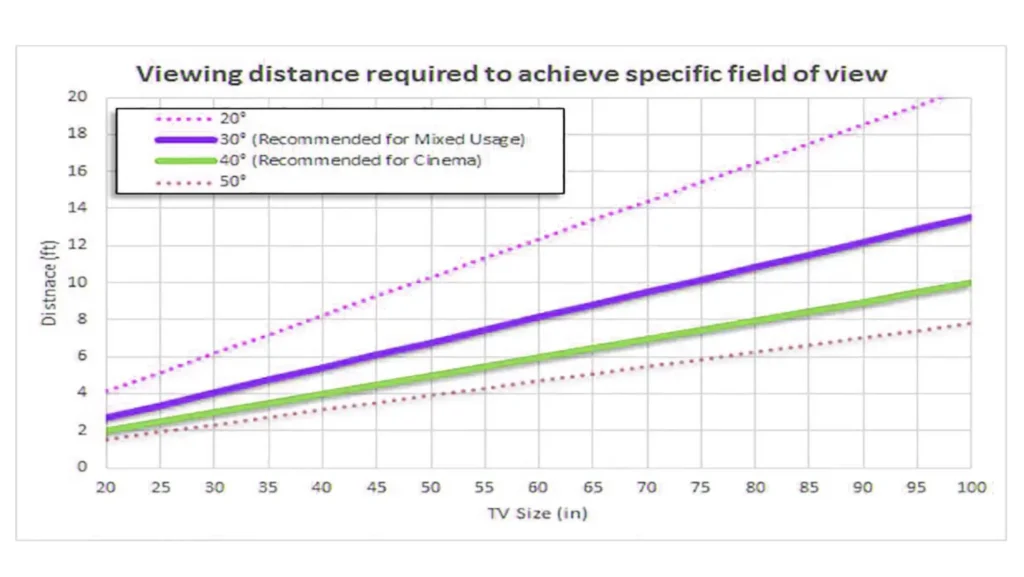
A screen’s physical size also influences how far viewers should be positioned:
- Smaller Screens: Closer viewing distance
- Larger Screens: Requires further viewing distance
LED Viewing Distance of Indoor and Outdoor Displays
Outdoor and indoor screens differ significantly due to their viewing environments. Outdoor screens typically have a larger pixel pitch due to the greater average viewing distance, often necessitated by broader audience fields.
Conversely, indoor screens benefit from smaller pitches since viewers are usually closer, needing finer detail and higher resolution for clear imaging.
How to Calculate the Viewing Distance of an LED Display
As mentioned above, pixel pitch has a direct impact on the viewing distance of a display. To estimate the LED viewing distance of a display, the first thing you need to do is understand the pixel pitch. Once you have the pixel pitch of your display, you can follow these steps to estimate the viewing distance:
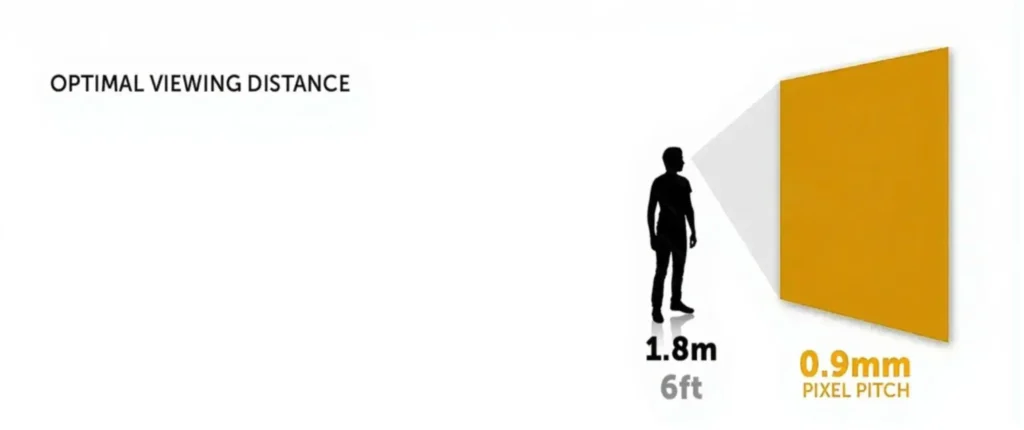
A simple and practical formula: LED viewing distance = (LED pixel pitch x 1000) to (LED pixel pitch x 3000) (unit: millimeters).
- Convert the pixel pitch from millimeters to meters (e.g., P2, i.e., 2mm converted to 2m).
- Multiply the result by 2 – this is the minimum optimal LED viewing distance (2m x 2 = 4 meters).
- Multiply the result by 3 – this is the maximum viewing distance of the LED display (2 x 3 = 6 meters).
- If you want the viewing distance in feet, multiply the result by 3. For example, the minimum viewing distance for P2 is 4 x 3 = 6 feet, and the maximum viewing distance is 6 x 3 = 18 feet.
Practical Application Scenario Analysis
- Conference Rooms and Training Venues: P1.2-P2 LED screens are suitable for medium-sized conference rooms, with a viewing distance of about 1.2 to 2 meters, ensuring clarity and facilitating interactive communication.
- Control Rooms and Command Centers: P0.9-P0.7 level screens require extremely high precision, with a viewing distance of less than 1 meter, ensuring operators can accurately identify every detail on the screen.
- Retail and Exhibition Displays: P2.0-P2 is suitable for large exhibition spaces, with a viewing distance of 1 to 2 meters, meeting both distant attraction and close-up needs.
- Indoor Stores and Stages: P2.5-P5 is suitable for large spaces, with a viewing distance of 2.5 to 5 meters, meeting both distant attraction and close-up needs.
- Outdoor Billboards: For open and distant installation locations, use P6, P8, P10, etc., with a viewing distance of over 6 meters, meeting distant attraction needs.
- Theaters and Studios: Ultra-high-definition displays below P1.5, with audience seating distances typically over 4 meters, but front-row viewers may need smaller pixel pitch screens for the best experience.
Conclusion
To achieve the best viewing experience, it is recommended to consider factors such as pixel pitch, resolution, size, and ambient lighting conditions when calculating the viewing distance of an LED display. You can also use relevant formulas for estimation and make adjustments to ensure a comfortable viewing experience.
Additionally, you can refer to pixel pitch and viewing distance tables to quickly analyze the appropriate pixel pitch (based on the determined display and viewing distance) or approximate installation distance (based on the determined pixel pitch). For further assistance with the viewing distance, consider contacting us.