









Colorlight media players are powerful devices for LED display, but sometimes they need a fresh start. Whether you’re troubleshooting issues or preparing the device for a new setup, a factory reset can be the perfect solution.
A factory reset isn’t just about clearing settings—it’s a way to restore optimal performance, eliminate glitches, and ensure your media player runs smoothly.
In this simple step-by-step guide, I’ll walk you through the easiest method to reset your Colorlight media player using just a USB drive. No technical expertise is needed—just follow these instructions, and you’ll have your device running like new in no time!
Ready to get started? Let’s dive in.
Steps to Reset the Colorlight Media Player
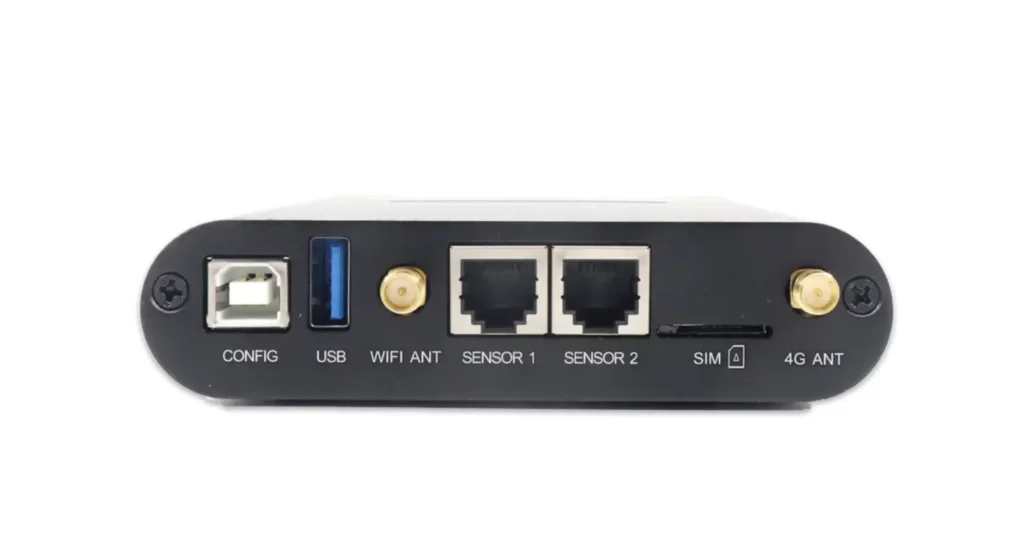
If your Colorlight media player is experiencing issues or you simply want to restore it to its original settings, you can easily perform a factory reset using a USB flash drive. Follow these simple steps to reset your device:
- Prepare the USB Drive
- Format a USB flash drive as NTFS or FAT32.
- Rename the USB drive to
RESETFACT(all uppercase, no quotes).
- Connect the USB Drive
- Insert the USB drive into the media player’s USB port.
- Disconnect the debug cable (USB printer cable) if it’s connected.
- Power Cycle the Device
- Turn off the media player and wait for 5 seconds.
- Power it back on and wait for about 10 minutes while the reset process completes.
- Remove the USB Drive
- Once the reset is done, safely remove the USB drive.
- Restart the Media Player
- Turn off the device again for 5 seconds, then power it back on.
- If the reset was successful, you should see the initial boot screen (a three-color orb animation).
More Resources After Reseted
After you have reset, you can check this guide about how to use Media Player: Colorlight Media Players Quick Guide.
Please note, once you have reset the media player, the initial password will be reset to: Console@123.